Embodied AI for RoboCup@Home 2027: Perception and Speech for a Home Robot
Embodied AI for NTU's RoboCup@Home 2027 robot: free-seat detection, 6-DoF object pose with MAC registration, and offline Whisper speech commands.
RoboCup@Home is an embodied AI benchmark. A service robot has to perceive a real home, understand the people in it and act: greet guests, fetch objects, follow people and hold a conversation. I founded and lead NTU’s 34-member embodied AI team, Singapore’s first RoboCup@Home team, preparing for RoboCup@Home 2027. This page covers our two robots and the parts of the software stack I built.
The robots
We work with two different robots.
Galaxea R1: our current development platform
The Galaxea R1 is a commercial wheeled humanoid: two arms on a lifting torso over a wheeled base. Ours runs ROS 2 Humble on a Jetson AGX Orin, with a RealSense D455 head camera, a Livox MID-360 LiDAR on the chassis and a ReSpeaker microphone array. Our software stack currently runs on the R1.
Our self-built robot
Separately from the R1, the team is building its own wheeled humanoid: a mecanum-wheel base, a vertical lift and two OpenArm arms.
A huge thank you to Aqid, Jing Yang and the hardware team. This robot is their work, and their contribution has been amazing. None of this hardware would exist without them.
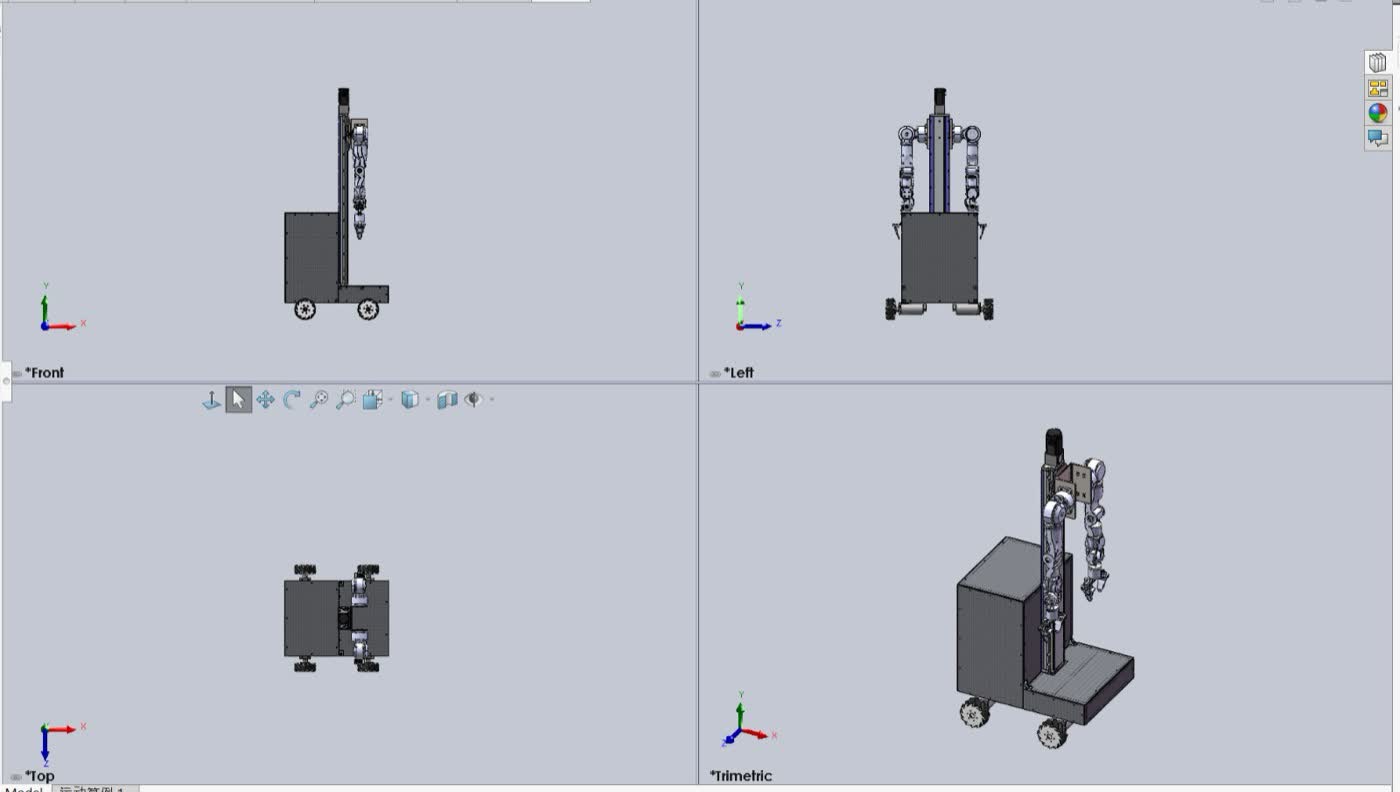 The self-built robot with two OpenArm arms, in CAD. Hardware by Aqid, Jing Yang and the hardware team.
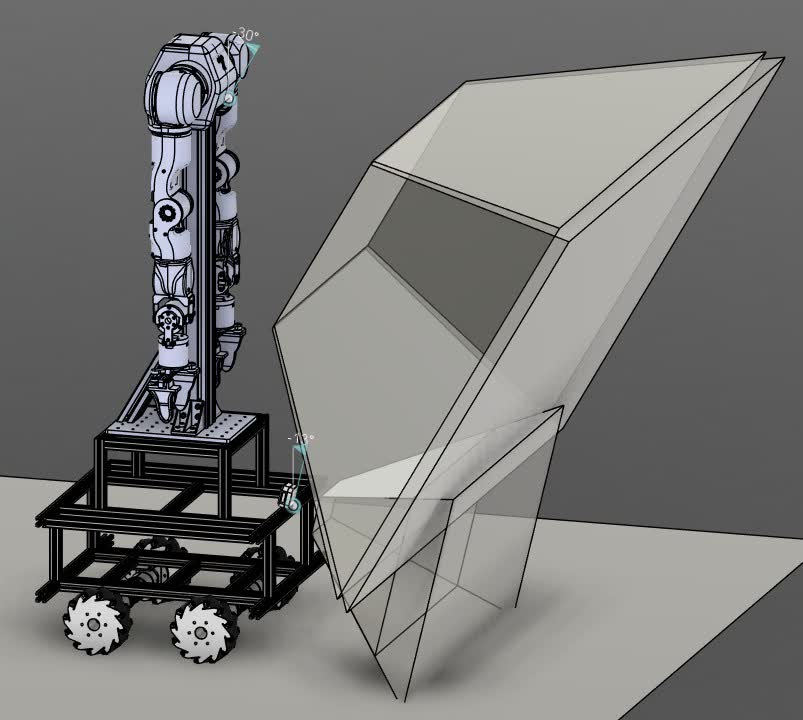 An early CAD prototype of the self-built robot: a mecanum base, a lift column and an arm. Hardware by Aqid, Jing Yang and the hardware team.
Software
The software is split into dozens of ROS 2 repositories (perception, manipulation, navigation, speech, behaviour trees) maintained by sub-teams. Tasks are scripted as behaviour trees that call perception and speech services.
Free-seat detection
In the guest-receptionist task, the robot must offer a new guest a free seat. “Free” is harder than it sounds: a chair with a bag on it is not free, and a chair hidden behind the person sitting on it still exists.
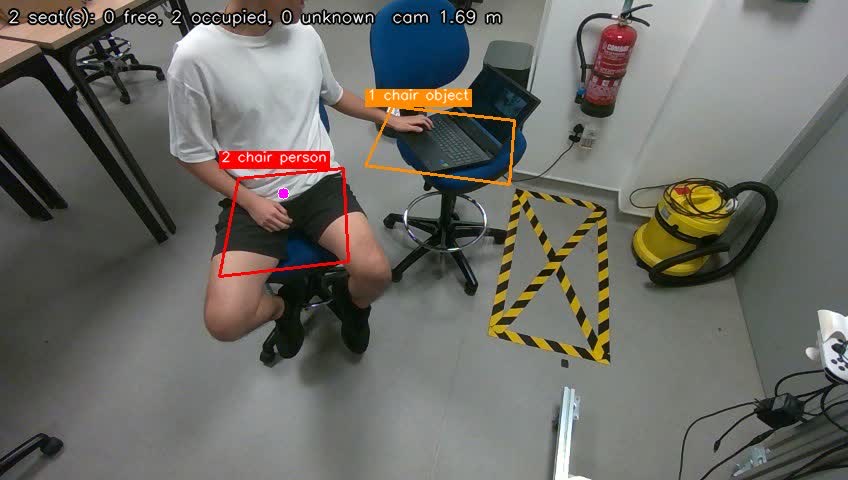 Live output on the R1 head camera: chair 2 is occupied by a person, and chair 1 by an object (a laptop).
The node runs a 2-second scan at 5 frames per second:
- Register depth into colour and fit the floor with RANSAC. All heights are measured from the floor.
- Find seats. YOLO detects chairs, couches and benches on about four frames. Inside each box, the lowest flat layer between 0.30 and 0.85 m is the seat surface. Couches are split into places about 0.55 m wide.
- Remember seats. A seat stays in a registry while the person sitting on it hides it from YOLO. A seated person with no chair detected underneath creates an implied, occupied seat.
- Test each seat, every frame:
- person: 3D hip keypoints at seat height.
- object: a bag, laptop, phone or book, or depth raised 12 cm above the seat.
- free: at least 40% of the bare surface visible.
- absent: the camera sees through where the seat was.
- Decide with hysteresis. “Occupied” takes effect immediately and holds for 10 s. “Free” needs three free frames in a row and no doubt in the last second. Anything unclear is UNKNOWN, and UNKNOWN is never offered.
It runs entirely on the CPU (about 13 ms per frame plus YOLO) so the GPU stays free for other nodes. In live tests it kept seat identities when people sat down, and never offered an occupied seat. In the example above, the laptop on the person’s lap hides their hips, so the seat is marked “object” rather than “person”. It’s still correctly excluded.
6-DoF object pose from point clouds
To grasp a known object, the arm needs its full position and orientation. I built a ROS 2 node that registers a reference point cloud of the object against the live D455 cloud using maximal-clique registration (MAC, CVPR 2023).
The node publishes the object’s pose in the camera frame. A quality gate rejects unreliable estimates: when a frame fails the gate, nothing is published, rather than a doubtful pose.
Registration steps: input correspondences, then the compatibility graph, then the maximal clique that decides the pose.
Offline speech commands
Competition venues have unreliable internet, and judges’ commands must be understood the first time. The speech pipeline runs fully on the robot:
microphone → voice activity detection → Whisper (whisper.cpp) → intent and slot parsing → verdict
The robot taking spoken commands. Its face screen reacts as it listens and replies.
The verdict matters most. For “take the milk from the dinner table”, the parser returns action take, object milk, place dinner table, and ACCEPT. If it mishears one word, it returns CONFIRM with the word it couldn’t place, so the operator fixes one word instead of repeating the sentence. If it can’t make sense of the sentence, it returns REJECT and asks again.
Two confidence scores catch different failures:
- Speech confidence: catches mumbled audio. A real command spoken unclearly scores low here.
- Command confidence: catches noise that Whisper hallucinates into a fluent sentence. That scores high on speech and zero on command.
Object and room vocabularies are plain Markdown files loaded at start-up, so they can be swapped for each event without rebuilding.
My role
The self-built robot is the work of Aqid, Jing Yang and the hardware team. Thank you. My own contributions:
- Lead the 34-member team, coordinating the perception, manipulation, navigation and speech sub-teams.
- Built the free-seat detector and the MAC pose estimator.
- Co-developed the offline speech-recognition pipeline and wrote the intent and verdict layer.
- Maintain the robot bring-up tools (one supervised tmux session for the R1 drivers, plus a battery monitor).